<?xml version="1.0" encoding="UTF-8"?>
<feed xmlns="http://www.w3.org/2005/Atom">
    <title>佐久間 ゆきの暇つぶし</title>
    <link rel="alternate" type="text/html" href="http://www.sakumayuki.com/" />
    <link rel="self" type="application/atom+xml" href="http://www.sakumayuki.com/atom.xml" />
    <id>tag:www.sakumayuki.com,2011-12-19://2</id>
    <updated>2012-05-18T14:02:28Z</updated>
    <subtitle>フリーなゲームクリエイターの日記</subtitle>
    <generator uri="http://www.sixapart.com/movabletype/">Movable Type Pro 5.12</generator>

<entry>
    <title>雨降って地盤沈下</title>
    <link rel="alternate" type="text/html" href="http://www.sakumayuki.com/2012/05/post-19.html" />
    <id>tag:www.sakumayuki.com,2012://2.29</id>

    <published>2012-05-18T14:01:00Z</published>
    <updated>2012-05-18T14:02:28Z</updated>

    <summary>我が家の裏に地盤沈下発見！ ...</summary>
    <author>
        <name>佐久間 ゆき</name>
        
    </author>
    
    
    <content type="html" xml:lang="ja" xml:base="http://www.sakumayuki.com/">
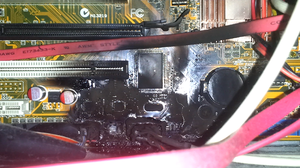
        <![CDATA[<a href="http://www.sakumayuki.com/assets_c/2012/05/0518-52.html" onclick="window.open('http://www.sakumayuki.com/assets_c/2012/05/0518-52.html','popup','width=600,height=800,scrollbars=no,resizable=no,toolbar=no,directories=no,location=no,menubar=no,status=no,left=0,top=0'); return false"><img src="http://www.sakumayuki.com/assets_c/2012/05/0518-thumb-300x400-52.jpg" width="300" height="400" alt="0518.jpg" class="mt-image-none" /></a><div><br /></div><div>我が家の裏に地盤沈下発見！</div><div> <div><br /></div></div>]]>
        
    </content>
</entry>

<entry>
    <title>マテリアルブレイブ本日発売！</title>
    <link rel="alternate" type="text/html" href="http://www.sakumayuki.com/2012/03/post-18.html" />
    <id>tag:www.sakumayuki.com,2012://2.28</id>

    <published>2012-03-23T14:41:29Z</published>
    <updated>2012-03-23T14:52:24Z</updated>

    <summary>戯画様より本日マテリアルブレイブが発売されました。作業前に少し遊ばせていただきま...</summary>
    <author>
        <name>佐久間 ゆき</name>
        
    </author>
    
        <category term="お仕事" scheme="http://www.sixapart.com/ns/types#category" />
    
        <category term="参加作品" scheme="http://www.sixapart.com/ns/types#category" />
    
    <category term="参加作品" label="参加作品" scheme="http://www.sixapart.com/ns/types#tag" />
    
    <content type="html" xml:lang="ja" xml:base="http://www.sakumayuki.com/">
        <![CDATA[<a href="http://www.sakumayuki.com/assets_c/2012/03/120323-49.html" onclick="window.open('http://www.sakumayuki.com/assets_c/2012/03/120323-49.html','popup','width=699,height=800,scrollbars=no,resizable=no,toolbar=no,directories=no,location=no,menubar=no,status=no,left=0,top=0'); return false"><img src="http://www.sakumayuki.com/assets_c/2012/03/120323-thumb-300x343-49.jpg" width="300" height="343" alt="120323.jpg" class="mt-image-none" /></a><div><br /></div><div>戯画様より本日マテリアルブレイブが発売されました。</div><div>作業前に少し遊ばせていただきましたが、久々に遊び応えのありそうな作品です。</div><div>仕事が終わったら、やりこみたいと思います。</div><div><br /></div><div>ついでなので、テストも兼ねてGALAXY S II LTEのカメラで撮影しました。</div><div>いままで自分の持ってた携帯のカメラが悪いのか、</div><div>携帯の割にキレイにとれた気がします。</div><div>反射する物を撮る時はこういうフラッシュの方が撮りやすいですね～</div><div>叶の頭に黒いのがついてるのは、保護シールとの間にゴミが入っているようで、</div><div>後でとりたいと思います。</div>]]>
        
    </content>
</entry>

<entry>
    <title>コメントについて</title>
    <link rel="alternate" type="text/html" href="http://www.sakumayuki.com/2012/01/post-17.html" />
    <id>tag:www.sakumayuki.com,2012://2.27</id>

    <published>2012-01-14T10:59:33Z</published>
    <updated>2012-01-14T11:01:50Z</updated>

    <summary>匿名のコメントを許可しました。ってか、今まで登録しないとコメント投稿できなかった...</summary>
    <author>
        <name>佐久間 ゆき</name>
        
    </author>
    
    
    <content type="html" xml:lang="ja" xml:base="http://www.sakumayuki.com/">
        <![CDATA[匿名のコメントを許可しました。<div><br /></div><div>ってか、今まで登録しないとコメント投稿できなかったのね......</div>]]>
        
    </content>
</entry>

<entry>
    <title>windows7 64bit版で画像ファイル(jpg等)をwindowsフォトビューアーで開くエラーが出る</title>
    <link rel="alternate" type="text/html" href="http://www.sakumayuki.com/2012/01/windows7-64bitjpgwindows.html" />
    <id>tag:www.sakumayuki.com,2012://2.26</id>

    <published>2012-01-13T07:35:47Z</published>
    <updated>2012-02-16T05:06:23Z</updated>

    <summary>いつからか、画像みたいな状態になってしまいました。PhotoShop等では開ける...</summary>
    <author>
        <name>佐久間 ゆき</name>
        
    </author>
    
        <category term="windows7 奮闘記" scheme="http://www.sixapart.com/ns/types#category" />
    
        <category term="パソコン" scheme="http://www.sixapart.com/ns/types#category" />
    
    
    <content type="html" xml:lang="ja" xml:base="http://www.sakumayuki.com/">
        <![CDATA[<div><a href="http://www.sakumayuki.com/assets_c/2012/01/0-4.html" onclick="window.open('http://www.sakumayuki.com/assets_c/2012/01/0-4.html','popup','width=1082,height=810,scrollbars=no,resizable=no,toolbar=no,directories=no,location=no,menubar=no,status=no,left=0,top=0'); return false"><img src="http://www.sakumayuki.com/assets_c/2012/01/0-thumb-300x224-4.jpg" width="300" height="224" alt="0.JPG" class="mt-image-none" /></a></div><div><br /></div><div>いつからか、画像みたいな状態になってしまいました。</div><div>PhotoShop等では開けるので問題はCOM Surrogateという物なのかなと調べてみたところ、</div><div>動画で同様のエラーが報告されているものの、画像では問題を提議している人はいても解決には至っていない感じでした。</div><div><br /></div><div>一応、自分なりに調べて、直ったのでメモしておきます。</div><div><br /></div><div><span class="caps">COM</span> Surrogateとは、なんぞやと調べていったところ、過程はとも置き「dllhost.exe」が正体であることが分かった。</div><div>で、これはwin7 64bit版だと"C:\Windows\SysWOW64"に入っているはず。</div><div>"C:\Windows\System32"には入ってないはずで、入っているとしたらこれはウイルスという資料もあった。</div><div>何か32bit版のソフトで同梱していたのかもしれないので真偽はさて置く。(ESET <span class="caps">NOD32</span> Antivirusでは非検知)</div><div><br /></div><div>思うに、これはwindowsフォトビューアーを起動する際"C:\Windows\System32"の「dllhost.exe」を使っているのではないかなと思い、</div><div>"C:\Windows\System32"の「dllhost.exe」をリネーム(適当に隔離でもOK)し"C:\Windows\SysWOW64"の「dllhost.exe」をコピーしてみようと考えた。</div><div><br /></div><div><b><font color="FF0000">(ここより、以下の処置に関しては動作の確認はしましたが、他のアプリケーションに悪影響が無いとは言い切れませんので、自己責任でお願いします。)</font></b></div><div><br /></div> ]]>
        <![CDATA[<div><br class="Apple-interchange-newline" />まず、32の「dllhost.exe」を「dllhost_.exe」にしようとしたところ、</div><div><br /></div><div><a href="http://www.sakumayuki.com/assets_c/2012/01/1-7.html" onclick="window.open('http://www.sakumayuki.com/assets_c/2012/01/1-7.html','popup','width=496,height=315,scrollbars=no,resizable=no,toolbar=no,directories=no,location=no,menubar=no,status=no,left=0,top=0'); return false"><img src="http://www.sakumayuki.com/assets_c/2012/01/1-thumb-300x190-7.jpg" width="300" height="190" alt="1.JPG" class="mt-image-none" /></a></div><div><br /></div><div>このファイルを変更するには、TrustedInstallerからアクセス許可を得る必要があります。</div><div><br /></div><div>またまた調べてみたところ、簡単に言うと「windowsを実行する上で重要なファイルは、windows自体が管理するよ、管理者？バカじゃないの？」との事でした。</div><div><br /></div><div>これを解決するには、ファイルの所有権を管理者に移す事から。コマンドプロンプトを開き"takeown /f C:\Windows\System32\dllhost.exe"を実行これで所有権が外れたはずですが、</div><div><br /></div><div><a href="http://www.sakumayuki.com/assets_c/2012/01/2-10.html" onclick="window.open('http://www.sakumayuki.com/assets_c/2012/01/2-10.html','popup','width=496,height=315,scrollbars=no,resizable=no,toolbar=no,directories=no,location=no,menubar=no,status=no,left=0,top=0'); return false"><img src="http://www.sakumayuki.com/assets_c/2012/01/2-thumb-300x190-10.jpg" width="300" height="190" alt="2.JPG" class="mt-image-none" /></a></div><div><br /></div><div>自分にアクセス許可を得ろと言われました。</div><div>アクセスの許可を自分に出します。</div><div><br /></div><div>「dllhost.exe」を右クリック-&gt;プロパティ-&gt;セキュリティのタブ(赤丸)-&gt;詳細設定を開きます(青丸)</div><div><br /></div><div><a href="http://www.sakumayuki.com/assets_c/2012/01/3-13.html" onclick="window.open('http://www.sakumayuki.com/assets_c/2012/01/3-13.html','popup','width=435,height=480,scrollbars=no,resizable=no,toolbar=no,directories=no,location=no,menubar=no,status=no,left=0,top=0'); return false"><img src="http://www.sakumayuki.com/assets_c/2012/01/3-thumb-300x331-13.jpg" width="300" height="331" alt="3.jpg" class="mt-image-none" /></a></div><div><br /></div><div>「アクセスの許可の変更」ボタン(赤丸)を押す</div><div><br /></div><div><a href="http://www.sakumayuki.com/assets_c/2012/01/4-16.html" onclick="window.open('http://www.sakumayuki.com/assets_c/2012/01/4-16.html','popup','width=450,height=450,scrollbars=no,resizable=no,toolbar=no,directories=no,location=no,menubar=no,status=no,left=0,top=0'); return false"><img src="http://www.sakumayuki.com/assets_c/2012/01/4-thumb-300x300-16.jpg" width="300" height="300" alt="4.jpg" class="mt-image-none" /></a></div><div><br /></div><div>「追加」ボタン(赤丸)を押す</div><div><br /></div><div><a href="http://www.sakumayuki.com/assets_c/2012/01/5-19.html" onclick="window.open('http://www.sakumayuki.com/assets_c/2012/01/5-19.html','popup','width=450,height=450,scrollbars=no,resizable=no,toolbar=no,directories=no,location=no,menubar=no,status=no,left=0,top=0'); return false"><img src="http://www.sakumayuki.com/assets_c/2012/01/5-thumb-300x300-19.jpg" width="300" height="300" alt="5.jpg" class="mt-image-none" /></a></div><div><br /></div><div>「詳細設定」ボタン(赤丸)を押す</div><div><br /></div><div><a href="http://www.sakumayuki.com/assets_c/2012/01/6-22.html" onclick="window.open('http://www.sakumayuki.com/assets_c/2012/01/6-22.html','popup','width=561,height=242,scrollbars=no,resizable=no,toolbar=no,directories=no,location=no,menubar=no,status=no,left=0,top=0'); return false"><img src="http://www.sakumayuki.com/assets_c/2012/01/6-thumb-300x129-22.jpg" width="300" height="129" alt="6.jpg" class="mt-image-none" /></a></div><div><br /></div><div>「オブジェクトの種類」ボタン(赤丸)を押す</div><div><br /></div><div><a href="http://www.sakumayuki.com/assets_c/2012/01/7-25.html" onclick="window.open('http://www.sakumayuki.com/assets_c/2012/01/7-25.html','popup','width=614,height=540,scrollbars=no,resizable=no,toolbar=no,directories=no,location=no,menubar=no,status=no,left=0,top=0'); return false"><img src="http://www.sakumayuki.com/assets_c/2012/01/7-thumb-300x263-25.jpg" width="300" height="263" alt="7.jpg" class="mt-image-none" /></a></div><div><br /></div><div>「ユーザー」のみチェックしOKボタンを押す</div><div><br /></div><div><a href="http://www.sakumayuki.com/assets_c/2012/01/8-28.html" onclick="window.open('http://www.sakumayuki.com/assets_c/2012/01/8-28.html','popup','width=595,height=277,scrollbars=no,resizable=no,toolbar=no,directories=no,location=no,menubar=no,status=no,left=0,top=0'); return false"><img src="http://www.sakumayuki.com/assets_c/2012/01/8-thumb-300x139-28.jpg" width="300" height="139" alt="8.jpg" class="mt-image-none" /></a></div><div><br /></div><div>場所の指定が自分のコンピュータ名になっていることを確認し、「検索」ボタン(赤丸)を押す</div><div><br /></div><div><a href="http://www.sakumayuki.com/assets_c/2012/01/9-31.html" onclick="window.open('http://www.sakumayuki.com/assets_c/2012/01/9-31.html','popup','width=614,height=540,scrollbars=no,resizable=no,toolbar=no,directories=no,location=no,menubar=no,status=no,left=0,top=0'); return false"><img src="http://www.sakumayuki.com/assets_c/2012/01/9-thumb-300x263-31.jpg" width="300" height="263" alt="9.jpg" class="mt-image-none" /></a></div><div><br /></div><div>下にユーザー一覧が出るので、現在ログインしているユーザを選択して、OKを2回</div><div><br /></div><div><a href="http://www.sakumayuki.com/assets_c/2012/01/10-34.html" onclick="window.open('http://www.sakumayuki.com/assets_c/2012/01/10-34.html','popup','width=614,height=540,scrollbars=no,resizable=no,toolbar=no,directories=no,location=no,menubar=no,status=no,left=0,top=0'); return false"><img src="http://www.sakumayuki.com/assets_c/2012/01/10-thumb-300x263-34.jpg" width="300" height="263" alt="10.jpg" class="mt-image-none" /></a></div><div><a href="http://www.sakumayuki.com/assets_c/2012/01/11-37.html" onclick="window.open('http://www.sakumayuki.com/assets_c/2012/01/11-37.html','popup','width=560,height=241,scrollbars=no,resizable=no,toolbar=no,directories=no,location=no,menubar=no,status=no,left=0,top=0'); return false"><img src="http://www.sakumayuki.com/assets_c/2012/01/11-thumb-300x129-37.jpg" width="300" height="129" alt="11.jpg" class="mt-image-none" /></a></div><div><br /></div><div>「dllhost.exeのアクセス許可エントリ」と言うのが出る</div><div>許可の「フルコントロール」のチェックボックスをクリックすると以下全部にチェックがつくはず。</div><div>それで「OK」ボタンを押す。</div><div><br /></div><div><a href="http://www.sakumayuki.com/assets_c/2012/01/12-40.html" onclick="window.open('http://www.sakumayuki.com/assets_c/2012/01/12-40.html','popup','width=435,height=448,scrollbars=no,resizable=no,toolbar=no,directories=no,location=no,menubar=no,status=no,left=0,top=0'); return false"><img src="http://www.sakumayuki.com/assets_c/2012/01/12-thumb-300x308-40.jpg" width="300" height="308" alt="12.jpg" class="mt-image-none" /></a></div><div><br /></div><div>全部OKボタンを押し閉じる。</div><div>途中「Windowsセキュリティ」という警告が出るが、確認した上で「はい」を押しておく。</div><div><br /></div><div><a href="http://www.sakumayuki.com/assets_c/2012/01/13-43.html" onclick="window.open('http://www.sakumayuki.com/assets_c/2012/01/13-43.html','popup','width=496,height=214,scrollbars=no,resizable=no,toolbar=no,directories=no,location=no,menubar=no,status=no,left=0,top=0'); return false"><img src="http://www.sakumayuki.com/assets_c/2012/01/13-thumb-300x129-43.jpg" width="300" height="129" alt="13.jpg" class="mt-image-none" /></a></div><div><br /></div><div><br /></div><div>とりあえずこれでリネームできるようになります。</div><div><br /></div><div>一端休憩、CoDMW3をプレイ</div><div><br /></div><div><br /></div><div><br /></div><div>散々な目に遭いました。</div><div><br /></div><div><br /></div><div><br /></div><div>ということで、"C:\Windows\System32\dllhost.exe"を"dllhost_.exe"にリネームし、C:\Windows\SysWOW64"の「dllhostexe」を"C:\Windows\System32"にコピーする。</div><div><br /></div><div><br /></div><div>これで、見事windowsフォトビューアーが使えるようになりました。</div><div><br /></div><div><a href="http://www.sakumayuki.com/assets_c/2012/01/14-46.html" onclick="window.open('http://www.sakumayuki.com/assets_c/2012/01/14-46.html','popup','width=1088,height=817,scrollbars=no,resizable=no,toolbar=no,directories=no,location=no,menubar=no,status=no,left=0,top=0'); return false"><img src="http://www.sakumayuki.com/assets_c/2012/01/14-thumb-300x225-46.jpg" width="300" height="225" alt="14.jpg" class="mt-image-none" /></a></div><div><br /></div><div>本来、32bit版の「dllhost.exe」が入っているところに、64bit版(？)が入っているので、今後副作用がないか見ていきたいと思います。</div><div><br /></div><div><br /></div><br class="Apple-interchange-newline" />]]>
    </content>
</entry>

<entry>
    <title>あけましておめでとうございます。</title>
    <link rel="alternate" type="text/html" href="http://www.sakumayuki.com/2012/01/post-16.html" />
    <id>tag:www.sakumayuki.com,2012://2.25</id>

    <published>2012-01-10T01:59:14Z</published>
    <updated>2012-01-10T02:11:56Z</updated>

    <summary> 年始、二回目の挨拶になります。本日から、仕事始めとしたいと思います。&amp;nbsp...</summary>
    <author>
        <name>佐久間 ゆき</name>
        
    </author>
    
        <category term="お仕事" scheme="http://www.sixapart.com/ns/types#category" />
    
    
    <content type="html" xml:lang="ja" xml:base="http://www.sakumayuki.com/">
        <![CDATA[<p> 年始、二回目の挨拶になります。</p><p>本日から、仕事始めとしたいと思います。</p><p>&nbsp;</p><p>まぁ仕事は無いんだけどね。</p><p>正月休みにやっていた2月からの仕事のスクリプトの解析とHTML5のお勉強をしたいと思います。</p><p>&nbsp;</p><p>変にスケジュールが空いてしまってるので営業もできないしね。</p><p>&nbsp;</p><p>&nbsp;</p><p>今年の抱負！</p><p>いい加減、どっかに腰を落ちつけたいなぁと思ってその為にいます。</p><p>&nbsp;</p><p>今年も、皆様、業界にとって良い年でありますように願っています。</p><p>&nbsp;</p><p>&nbsp;</p>]]>
        
    </content>
</entry>

<entry>
    <title>あけましておめでとうございます。</title>
    <link rel="alternate" type="text/html" href="http://www.sakumayuki.com/2012/01/post-15.html" />
    <id>tag:www.sakumayuki.com,2012://2.24</id>

    <published>2012-01-01T15:43:53Z</published>
    <updated>2012-01-01T16:30:35Z</updated>

    <summary>あけましておめでとうございます。本年も何卒よろしくお願いいたします。さて、本年の...</summary>
    <author>
        <name>佐久間 ゆき</name>
        
    </author>
    
        <category term="食べ物" scheme="http://www.sixapart.com/ns/types#category" />
    
    
    <content type="html" xml:lang="ja" xml:base="http://www.sakumayuki.com/">
        <![CDATA[あけましておめでとうございます。<div>本年も何卒よろしくお願いいたします。</div><div><br /></div><div>さて、本年の抱負は後々発表するとして。</div><div>まずはネタから！</div><div><br /></div><div>昨年話題になったネットでのおせち注文</div><div>昨年のニュース性もあり、ネタにもなるし、さすがに今年はどこも気をつけるだろうと我が家でも注文してみました。</div><div><br /></div><div>注文したのはこちら</div><div><img alt="11_1.jpg" src="http://www.sakumayuki.com/2012/01/02/11_1.jpg" width="500" height="250" class="mt-image-none" /></div><div><br /></div><div><a href="http://www.rakuten.co.jp/sharizou/">楽天「創作寿司職人の店「しゃり蔵」」さんの憩御膳</a></div><div>定価15,000円のところ12/28注文と言うこともあり、5,980円で在庫セールしてました。</div><div><br /></div><div>正月までに届くかという心配もありましたが、冷凍配送で在庫200個くらいあったので</div><div>既に作ってある物を冷凍保存して送っているのだろうという考えでポチッっといっちゃいました。</div><div><br /></div><div>12/31にお見事というタイミングで届きました。</div><div>すごくBESTなタイミングですね～</div><div><br /></div><div>さて届いて写真を撮ろうしたのですが、</div><div>まだ凍っていたので、冷蔵庫で解凍の後、の写真がこちら</div><div><br /></div><div><img alt="11_2.jpg" src="http://www.sakumayuki.com/2012/01/02/11_2.jpg" width="300" height="225" class="mt-image-none" /></div><div><br /></div><div>お見事！見た目問題なし、</div><div>味も腐った感じもないし、素直に言えばおいしかったです。</div><div>(自分好みを言えばやや甘めだった)</div><div><br /></div><div><br /></div><div><br /></div><div><br /></div><div><br /></div><div>ただね、ただね、</div><div><img alt="11_3.jpg" src="http://www.sakumayuki.com/2012/01/02/11_3.jpg" width="300" height="221" class="mt-image-none" /></div><div><br /></div><div>結構ちっちゃかった。</div><div>3人前という割には豪華なおかず(ローストビーフとか）</div><div>が二つしかはいってなかったり。</div><div>でも5,980円なら満足かな。</div><div><br /></div><div>15,000円だったらとかんがええると......</div><div>最初から値引きの額で販売してたんじゃね？</div><div><br /></div><div>ちなみに私はたばこをやめて1年以上になります。</div><div>借り物です。</div><div><br /></div><div>なにはともあれ、今年もよろしくお願いします。</div><div><br /></div><div><br /></div>]]>
        
    </content>
</entry>

<entry>
    <title>シナリオライターとしての改めての出発</title>
    <link rel="alternate" type="text/html" href="http://www.sakumayuki.com/2011/12/post-14.html" />
    <id>tag:www.sakumayuki.com,2011://2.23</id>

    <published>2011-12-17T15:00:40Z</published>
    <updated>2011-12-19T08:55:44Z</updated>

    <summary>この場を借りまして、シナリオライターとしての商業、同人での活動を請け負うことを発...</summary>
    <author>
        <name>佐久間 ゆき</name>
        
    </author>
    
        <category term="お仕事" scheme="http://www.sixapart.com/ns/types#category" />
    
    
    <content type="html" xml:lang="ja" xml:base="http://www.sakumayuki.com/">
        <![CDATA[<b>この場を借りまして、シナリオライターとしての商業、</b><div><b>同人での活動を請け負うことを発表させていただきます。</b></div><div><b><br /></b></div><div>同人では別のPNで少しやっていたのですが、あまり自信が無かったので前に出さないでいましたが、</div><div>外に出せる文章としての最低ラインを自分で超えたと判断しましたので覚悟を決めました。</div><div><br /></div><div>それでもまだまだ駆け出しですので、生暖かい目で見てもらえるとがんばれます。</div><div><br /></div><div>小さいお仕事、シーン単体やエロシーン単体からでもお受けしたいと思っております。</div><div><br /></div><div>また、企画、ディレクションなどは以前からやっていますので併用でのご依頼もお待ちしております。</div><div><br /></div><div>何卒、よろしくお願いいたします。</div>]]>
        <![CDATA[<div><br /></div><div>若いんだから、出し惜しみせず仕事しよう！</div>]]>
    </content>
</entry>

<entry>
    <title>GALAXY S II LTE購入</title>
    <link rel="alternate" type="text/html" href="http://www.sakumayuki.com/2011/11/galaxy-s-ii-lte.html" />
    <id>tag:www.sakumayuki.com,2011://2.22</id>

    <published>2011-11-24T16:43:49Z</published>
    <updated>2011-12-19T08:55:44Z</updated>

    <summary>本日発売日に、GALAXY S II LTEに機種変更しました！保護フィルムが到...</summary>
    <author>
        <name>佐久間 ゆき</name>
        
    </author>
    
        <category term="新商品" scheme="http://www.sixapart.com/ns/types#category" />
    
    
    <content type="html" xml:lang="ja" xml:base="http://www.sakumayuki.com/">
        <![CDATA[<div>本日発売日に、</div><div>GALAXY S II LTEに機種変更しました！</div><div><br /></div><div>保護フィルムが到着したらいろいろいじってみます！</div><div><br /></div><div><a href="http://www.sakumayuki.com/assets_c/2011/11/1125-38.html" onclick="window.open('http://www.sakumayuki.com/assets_c/2011/11/1125-38.html','popup','width=300,height=418,scrollbars=no,resizable=no,toolbar=no,directories=no,location=no,menubar=no,status=no,left=0,top=0'); return false"><img src="http://www.sakumayuki.com/assets_c/2011/11/1125-thumb-300x418-38.jpg" width="300" height="418" alt="1125.jpg" class="mt-image-none" /></a></div><div><br /></div>]]>
        
    </content>
</entry>

<entry>
    <title>windows7奮闘記 その4 共有プリンタ編</title>
    <link rel="alternate" type="text/html" href="http://www.sakumayuki.com/2011/11/windows7-4-1.html" />
    <id>tag:www.sakumayuki.com,2011://2.20</id>

    <published>2011-11-03T02:55:32Z</published>
    <updated>2011-12-19T08:55:44Z</updated>

    <summary>書いてた記事がフリーズしてパァになった。。。さて、今回はプリンター編win7 6...</summary>
    <author>
        <name>佐久間 ゆき</name>
        
    </author>
    
        <category term="windows7 奮闘記" scheme="http://www.sixapart.com/ns/types#category" />
    
        <category term="パソコン" scheme="http://www.sixapart.com/ns/types#category" />
    
    
    <content type="html" xml:lang="ja" xml:base="http://www.sakumayuki.com/">
        <![CDATA[<div>書いてた記事がフリーズしてパァになった。。。</div><div><br /></div><div>さて、今回はプリンター編</div><div>win7 64bitのパソコンで共有にしているプリンタをXP32bitのマシンで使う方法。</div><div><br /></div><div>今まではOSが同じだったためマイネットワークからWクリックでちょちょいと使えたんだが</div><div>今回はOSと64bitという壁があるので、ドライバがもちろん違いその方法では使えない。</div><div>ドライバだけXP用のをインストールしても、そのドライバは違うものだといわれてしまう。</div><div><br /></div><div>少し、調べて使えるようになったのでまとめます。</div><div><br /></div><div>今回の構成</div><div>メインマシン Win7 &nbsp;64bit　(共有名：Main-machine)</div><div>サブマシン &nbsp; WinXP 32bit</div><div>プリンター &nbsp; Canon MP770(共有名：MP770)</div><div><br /></div><div>プリンターの場所を「\\Main-machine\MP770」とする。</div><div>メインマシン側で共有状態にしてあり、サブマシンからネットワークでアクセスすると↓のように見える状態からまとめるよ</div><div><br /></div><div><a href="http://www.sakumayuki.com/assets_c/2011/11/00-17.html" onclick="window.open('http://www.sakumayuki.com/assets_c/2011/11/00-17.html','popup','width=517,height=389,scrollbars=no,resizable=no,toolbar=no,directories=no,location=no,menubar=no,status=no,left=0,top=0'); return false"><img src="http://www.sakumayuki.com/assets_c/2011/11/00-thumb-300x225-17.jpg" width="300" height="225" alt="00.JPG" class="mt-image-none" /></a></div><div><br /></div><div>■手順1　サブマシンにプリンタをインストールする。</div><div><br /></div><div>ドライバをインストールではなく、サブマシンにUSBでプリンタをつなげてインストールする。</div><div>この状態でサブマシンから印刷できるか確認</div><div><br /></div><div>↓成功時の「スタート-&gt;プリンタとFAX」の画面</div><div><br /></div><div><a href="http://www.sakumayuki.com/assets_c/2011/11/01-20.html" onclick="window.open('http://www.sakumayuki.com/assets_c/2011/11/01-20.html','popup','width=494,height=394,scrollbars=no,resizable=no,toolbar=no,directories=no,location=no,menubar=no,status=no,left=0,top=0'); return false"><img src="http://www.sakumayuki.com/assets_c/2011/11/01-thumb-300x239-20.jpg" width="300" height="239" alt="01.JPG" class="mt-image-none" /></a></div><div><br /></div><div>■手順2　メインマシンにプリンタを接続</div><div><br /></div><div>サブマシンからUSBを抜きメインマシンへつなげる</div><div>サブマシン側からプリンタをみるとオフラインになっている。</div><div><br /></div><div>↓こんなかんじ</div><div><a href="http://www.sakumayuki.com/assets_c/2011/11/02-23.html" onclick="window.open('http://www.sakumayuki.com/assets_c/2011/11/02-23.html','popup','width=494,height=394,scrollbars=no,resizable=no,toolbar=no,directories=no,location=no,menubar=no,status=no,left=0,top=0'); return false"><img src="http://www.sakumayuki.com/assets_c/2011/11/02-thumb-300x239-23.jpg" width="300" height="239" alt="02.JPG" class="mt-image-none" /></a></div><div><br /></div><div>■手順3　サブマシンのプリンタポートを変更</div><div>「スタート-&gt;プリンタとFAX」の該当のプリンタ(今回は「Canon MP770 Series Printer」)を右クリックしプロパティ</div><div>出てきた画面のポートのタブをクリックすると下の画面になる</div><div><br /></div><div><a href="http://www.sakumayuki.com/assets_c/2011/11/04-26.html" onclick="window.open('http://www.sakumayuki.com/assets_c/2011/11/04-26.html','popup','width=614,height=484,scrollbars=no,resizable=no,toolbar=no,directories=no,location=no,menubar=no,status=no,left=0,top=0'); return false"><img src="http://www.sakumayuki.com/assets_c/2011/11/04-thumb-300x236-26.jpg" width="300" height="236" alt="04.JPG" class="mt-image-none" /></a></div><div><br /></div><div>真ん中やや下にあるポートの追加ボタンを押す(上画像の青丸)</div><div><br /></div><div><br /></div><div>出てきた画面で「Local Port」を選択して「新しいポート」ボタンをクリック</div><div><br /></div><div><a href="http://www.sakumayuki.com/assets_c/2011/11/05-29.html" onclick="window.open('http://www.sakumayuki.com/assets_c/2011/11/05-29.html','popup','width=409,height=191,scrollbars=no,resizable=no,toolbar=no,directories=no,location=no,menubar=no,status=no,left=0,top=0'); return false"><img src="http://www.sakumayuki.com/assets_c/2011/11/05-thumb-autoxauto-29.jpg" width="409" height="191" alt="05.JPG" class="mt-image-none" /></a></div><div><br /></div><div><a href="http://www.sakumayuki.com/assets_c/2011/11/06-32.html"><img src="http://www.sakumayuki.com/assets_c/2011/11/06-thumb-autoxauto-32.jpg" width="381" height="95" alt="06.JPG" class="mt-image-none" style="border-style: initial; border-color: initial; border-style: initial; border-color: initial; " /></a></div><div><br /></div><div>テキストボックスにプリンタの位置(今回は「\\Main-machine\MP770」)を指定してOKボタンを押す。</div><div>「プリンタ ポート」画面も閉じる</div><div><br /></div><div><a href="http://www.sakumayuki.com/assets_c/2011/11/08-35.html" onclick="window.open('http://www.sakumayuki.com/assets_c/2011/11/08-35.html','popup','width=614,height=484,scrollbars=no,resizable=no,toolbar=no,directories=no,location=no,menubar=no,status=no,left=0,top=0'); return false"><img src="http://www.sakumayuki.com/assets_c/2011/11/08-thumb-300x236-35.jpg" width="300" height="236" alt="08.JPG" class="mt-image-none" /></a></div><div><br /></div><div>なんということでしょう。一覧に「\\Main-machine\MP770」が追加されました。</div><div>チェックがされてることを確認して適用して閉じる。</div><div><br /></div><div>■手順4 オフラインになっているプリンターをオンラインにし、テストする</div><div><br /></div><div>あとはプリンタをオンラインにするだけです。</div><div>もう開いているとは思うけど、「スタート-&gt;プリンタとFAX」</div><div>該当のプリンタを右クリックし「プリンタをオンラインで使用する」を選択する。</div><div><br /></div><div>後はテスト印刷して、成功をかみしめろ！</div><div><br /></div><div><br /></div><div>●雑記</div><div>なんかこれが、正式なプリンタの共有の仕方だそうな</div><div>マイネットワーク越しにWクリックして共有するのは邪道とかどっかに書いてあったなぁ</div><div><br /></div><div>いちいちプリンタをつながなきゃいけんのがめんどくさいよなぁ</div>]]>
        
    </content>
</entry>

<entry>
    <title>恋愛0キロメートル本日発売</title>
    <link rel="alternate" type="text/html" href="http://www.sakumayuki.com/2011/10/0-1.html" />
    <id>tag:www.sakumayuki.com,2011://2.19</id>

    <published>2011-10-28T01:04:24Z</published>
    <updated>2011-12-19T08:55:44Z</updated>

    <summary>スクリプトで参加しました、「恋愛0キロメートル」が本日発売です。機密保持事項など...</summary>
    <author>
        <name>佐久間 ゆき</name>
        
    </author>
    
        <category term="お仕事" scheme="http://www.sixapart.com/ns/types#category" />
    
    
    <content type="html" xml:lang="ja" xml:base="http://www.sakumayuki.com/">
        <![CDATA[スクリプトで参加しました、「恋愛0キロメートル」が本日発売です。<div>機密保持事項などあるので、こういうときはどう宣伝すればいいんだろうか。</div><div>おもしろい作品になっておりますので、どうぞ、購入してプレイしてください。</div><div>と書くと味気ないんだよなぁ・・・、おもしろいのは事実ですので是非！</div><div><br /></div><div>さて<b>原状のお仕事状況</b></div><div>11月頭～中旬、12月～翌年2月まであいております。</div><div>企画、スクリプト、デバッグ、音声関係等、お仕事がありましたら何なりとお問い合わせください。</div><div>スケジュールが合わない場合でも、調整できる範囲の可能性もありますので、是非に！</div>]]>
        
    </content>
</entry>

<entry>
    <title>ツイッターのブログパーツ</title>
    <link rel="alternate" type="text/html" href="http://www.sakumayuki.com/2011/10/post-13.html" />
    <id>tag:www.sakumayuki.com,2011://2.18</id>

    <published>2011-10-25T00:23:46Z</published>
    <updated>2011-12-19T08:55:44Z</updated>

    <summary>ツイッターがまだ使いこなせていないのに、ブログパーツをつけてみました。体調悪いの...</summary>
    <author>
        <name>佐久間 ゆき</name>
        
    </author>
    
    
    <content type="html" xml:lang="ja" xml:base="http://www.sakumayuki.com/">
        <![CDATA[ツイッターがまだ使いこなせていないのに、ブログパーツをつけてみました。<div>体調悪いので今日はこの辺で・・・</div>]]>
        
    </content>
</entry>

<entry>
    <title>柏市根戸</title>
    <link rel="alternate" type="text/html" href="http://www.sakumayuki.com/2011/10/post-12.html" />
    <id>tag:www.sakumayuki.com,2011://2.17</id>

    <published>2011-10-22T21:23:06Z</published>
    <updated>2011-12-19T08:55:44Z</updated>

    <summary>柏市根戸で高い放射線量が検出されたらしい。 何を隠そう、小学校ん年まで過ごしてい...</summary>
    <author>
        <name>佐久間 ゆき</name>
        
    </author>
    
        <category term="ニュース" scheme="http://www.sixapart.com/ns/types#category" />
    
    
    <content type="html" xml:lang="ja" xml:base="http://www.sakumayuki.com/">
        <![CDATA[<p>柏市根戸で高い放射線量が検出されたらしい。</p>
<p>何を隠そう、小学校ん年まで過ごしていたズバリの住所</p>
<p>&nbsp;</p>
<p>あの頃はおんぼろ市営住宅が並んでいたけれど、今はきれいな住宅が並んでいる。</p>
<p>目の前の公園も無くなり、駄菓子やがスナックになってたり、</p>
<p>ちょっと感慨深い</p>
<p>&nbsp;</p>
<p>落ち着いたら、少し探検しにいこう</p>]]>
        
    </content>
</entry>

<entry>
    <title>最近はまっているもの</title>
    <link rel="alternate" type="text/html" href="http://www.sakumayuki.com/2011/10/post-11.html" />
    <id>tag:www.sakumayuki.com,2011://2.16</id>

    <published>2011-10-21T06:15:23Z</published>
    <updated>2011-12-19T08:55:44Z</updated>

    <summary>「木村屋のジャンボむしケーキプレーン」と「BOSSなめらか生クリームのとろけるカ...</summary>
    <author>
        <name>佐久間 ゆき</name>
        
    </author>
    
        <category term="新商品" scheme="http://www.sixapart.com/ns/types#category" />
    
        <category term="食べ物" scheme="http://www.sixapart.com/ns/types#category" />
    
    
    <content type="html" xml:lang="ja" xml:base="http://www.sakumayuki.com/">
        <![CDATA[<a href="http://www.sakumayuki.com/assets_c/2011/10/10_21_1-11.html" onclick="window.open('http://www.sakumayuki.com/assets_c/2011/10/10_21_1-11.html','popup','width=500,height=244,scrollbars=no,resizable=no,toolbar=no,directories=no,location=no,menubar=no,status=no,left=0,top=0'); return false"><img src="http://www.sakumayuki.com/assets_c/2011/10/10_21_1-thumb-300x146-11.jpg" width="300" height="146" alt="10_21_1.jpg" class="mt-image-none" /></a><div><br /></div><div>「木村屋のジャンボむしケーキプレーン」と「BOSSなめらか生クリームのとろけるカフェオレ」</div><div>深夜帯に食べるとぶくぶくと・・・</div><div><br /></div><div>ついでに新商品レビュー</div><div><a href="http://www.sakumayuki.com/assets_c/2011/10/P1000293-14.html" onclick="window.open('http://www.sakumayuki.com/assets_c/2011/10/P1000293-14.html','popup','width=500,height=329,scrollbars=no,resizable=no,toolbar=no,directories=no,location=no,menubar=no,status=no,left=0,top=0'); return false"><img src="http://www.sakumayuki.com/assets_c/2011/10/P1000293-thumb-300x197-14.jpg" width="300" height="197" alt="P1000293.jpg" class="mt-image-none" /></a></div><div>ローソンとTBSドラマ南極大陸とのコラボ商品「ホワイトチョコラスクの山」</div><div>ウソみたいだろ・・・全部くっついてるんだぜソレ</div><div><br /></div><div>食いにくいです</div><div>味はどうかと食べてみると</div><div>ホワイトチョコが乳臭い・・・</div><div>食ってると徐々にパンの味になっていく</div><div>ラスク部分はうまい！</div><div>という感じです</div><div><br /></div>]]>
        
    </content>
</entry>

<entry>
    <title>windows7奮闘記 その3</title>
    <link rel="alternate" type="text/html" href="http://www.sakumayuki.com/2011/10/windows7-3.html" />
    <id>tag:www.sakumayuki.com,2011://2.15</id>

    <published>2011-10-20T17:46:36Z</published>
    <updated>2011-12-19T08:55:44Z</updated>

    <summary>共有フォルダの作成 XPの時の用に簡単に他PCからアクセスできるようにする方法 ...</summary>
    <author>
        <name>佐久間 ゆき</name>
        
    </author>
    
        <category term="windows7 奮闘記" scheme="http://www.sixapart.com/ns/types#category" />
    
        <category term="パソコン" scheme="http://www.sixapart.com/ns/types#category" />
    
    
    <content type="html" xml:lang="ja" xml:base="http://www.sakumayuki.com/">
        <![CDATA[<p><b><font color="#0000FF">共有フォルダの作成</font></b></p>
<p>XPの時の用に簡単に他PCからアクセスできるようにする方法</p>
<p>コントロールパネル-&gt;ホームグループ-&gt;共有の詳細設定の変更　へと進み</p>
<p>"パスワード保護の共有"を無効にすれば従来通りの共有ができる。</p>
<p>共有フォルダを作る側も少しめんどくさくなっていた。</p>
<p>&nbsp;</p>
<p><b><font color="#0000FF">IE9でMovable Typeの使用方法</font></b></p>
<p>昨日も書いた通り、IE9だとMovable Typeの本文が書けない。</p>
<p>調べたところ、右上の設定から「F12開発者ツール」を出し、</p>
<p>下のメニューの「ドキュメントモード」を「IE8標準」にすると使えるらしい。</p>
<p>使えるけど、これはIEの話でSleipnirだとつかえんわな</p>
<p>Firefoxに乗り換えるいいチャンスかなぁ。。。</p>
<p>Sleipnirを標準で使う理由は、RSSツール「Headline-Reader」がひじょーに使いやすいから。</p>
<p>Firefoxのアドオンで似たようなものがあっても、ここまで使いやすいの見つからなかったんだよね。</p>
<p>&nbsp;</p>
<p>ブラウザの話のついでに</p>
<p><b><font color="#0000FF">デフォルトブラウザの指定方法</font></b></p>
<p>検索すれば簡単に出てくるが、スタートメニューの規定のプログラムをで「規定のプログラムを設定」</p>
<p>そこでデフォルトにしたいブラウザを選び右の「すべて～」を選べば手っ取り早い。「規定で」を選ぶときは「HTTP」と「HTTPS」のプロトコルを選べばいいのかな？</p>
<p>さて問題発生、アーカイブ版のSleipnirを使っているので一覧にSleipnirが出てこない。</p>
<p>レジストリをいじって登録・・・めんどくさいからインストール版をDLしてきましたとさ。</p>
<p>設定一からやり直しだわ。。。</p>]]>
        
    </content>
</entry>

<entry>
    <title>windows7奮闘記 その2</title>
    <link rel="alternate" type="text/html" href="http://www.sakumayuki.com/2011/10/windows7-2.html" />
    <id>tag:www.sakumayuki.com,2011://2.14</id>

    <published>2011-10-19T16:20:17Z</published>
    <updated>2011-12-19T08:55:44Z</updated>

    <summary>玄箱にアクセスができない！って前にもType-PのVISTAでも問題になったよう...</summary>
    <author>
        <name>佐久間 ゆき</name>
        
    </author>
    
        <category term="windows7 奮闘記" scheme="http://www.sixapart.com/ns/types#category" />
    
        <category term="パソコン" scheme="http://www.sixapart.com/ns/types#category" />
    
    
    <content type="html" xml:lang="ja" xml:base="http://www.sakumayuki.com/">
        <![CDATA[玄箱にアクセスができない！<br />って前にもType-PのVISTAでも問題になったような気がしてちょっと検索<br /><br /><b><font color="#ff0000">Professional</font></b>ならば<br />「コントロールパネル-&gt;管理ツール-&gt;ローカルセキュリティポリシー」<br />ツリーで「ローカルポリシ-&gt;セキュリティオプション」を選択。<br />右の「ネットワークセキュリティ：LAN Manager認証レベル」項目をダブルクリックし、<br />「ローカルセキュリティの設定」タブのリストボックスを「NTLM応答のみ送信する」にするといけるらしい。<br /><br />今回は<b><font color="#ff0000">HomePremium</font></b>なためレジストリをいじると良いらしいとのこと<br />「HKEY_LOCAL_MACHINE/System/CurrentControlSet/Control/Lsa」を探し<br />LmCompatibilityLevelをさがして値を2にすればいいらしい。<br />LmCompatibilityLevelがねえよ！<br />新規で追加するにも値の型がわからないし！<br />ということで、「LmCompatibilityLevel」を全体的に検索してみると。<br />DWORDで存在した(修復用のバックアップっぽいところ)<br />DWORDで追加したら、無事に接続できた。<br /><br />けど、不定期にパスワード要求される・・・<br /><br />ってか、めんどくせ！<br />玄箱に仕事のテンプレとか開発ツール入れてるから、今後考えもんだな・・・<br /><br />ついでに、IE9でブログを書けない・・・<br />これもあとで調べるか・・・<br />]]>
        
    </content>
</entry>

</feed>